Community articles
How to Build in Public to Attract Paying Users: 5 Real Examples
Build in public by showing a customer problem, the progress you’ve made solving it, and a clear way to try the result. Each update should help someone…
By Uriel Bitton · · 4 min read
5
Build in public by showing a customer problem, the progress you’ve made solving it, and a clear way to try the result. Each update should help someone decide whether your product belongs in their working day.
The useful question is: what uncertainty does this post remove for a potential buyer? A demo can make the result believable. A specific use case can make the product relevant. A clear offer can make the next step easier.
Choose your audience before choosing what to share. If you sell scheduling software to tutors, discuss missed lessons, parent reminders, and filling cancellations. Talk to tutors where they already spend time. Technical build notes can still be interesting, but explain what the change means for the person who might pay for it.
These five founder posts show those moves in practice. The analysis below explains their structure; screenshots, engagement counts, and launch announcements alone don’t establish how many sales an individual post caused. Historical offers are examples, not current promotions.
1. Tony Dinh: start with an irritation buyers recognize
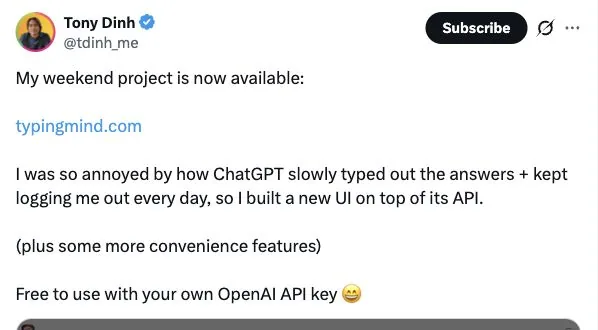
Screenshot: Tony Dinh’s TypingMind launch on X.
In his March 2023 TypingMind launch post, Tony described two frustrations: slow answers and repeatedly being logged out. He introduced his alternative interface and linked directly to it.
That makes the product easy to place. Someone experiencing those problems can recognize the value before reading a feature list.
In his launch retrospective, Tony attributed most early sales to his Twitter reach, while acknowledging his existing audience and previous failed products. The practical lesson is to connect progress to a recognizable job. For an invoicing tool, explain how a change helps a freelancer collect an overdue payment. Then show the actual workflow.
2. Danny Postma: put the result where people can inspect it

Screenshot: Danny Postma’s HeadshotPro launch on X.
Danny’s HeadshotPro launch puts example headshots beside a specific audience: remote teams and individuals. The thread then explains the problem of coordinating matching team photos.
The output does much of the explaining. A buyer can start judging whether the style suits their team, rather than imagining what “AI photography” means.
Apply this by posting something your customer would actually receive: an exported report, an edited clip, or a completed design. Add enough context to assess it fairly. Explain the input and any cleanup required. Use your own material or get permission for customer examples. A believable result gives someone a reason to investigate your offer.
3. Jon Yongfook: make the first useful action obvious
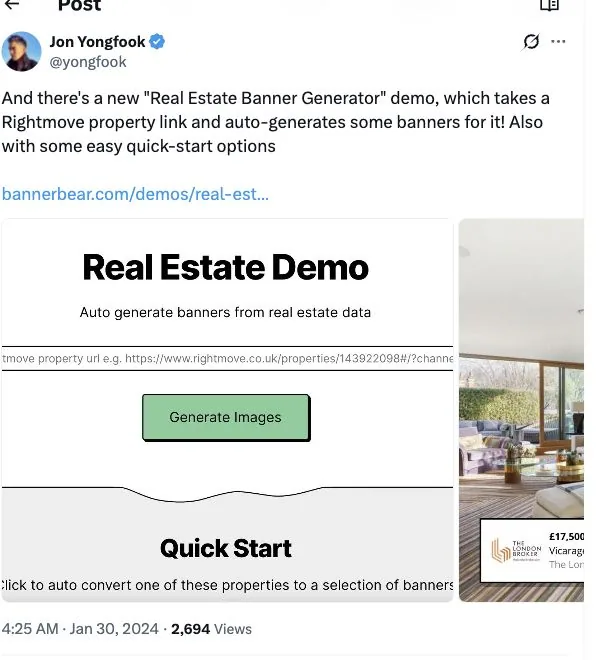
Screenshot: Jon Yongfook’s Bannerbear demo update on X.
Jon’s Bannerbear update introduces a real-estate banner generator that takes a Rightmove property link. The screenshot shows the input, generated banners, and quick-start examples.
That gives a particular customer a concrete experiment. An estate agent can understand what to bring and what comes back.
For your next update, narrow the invitation to one task. Give people a sample file, a preset, or a short walkthrough so they can reach the useful part quickly. If the product needs setup, explain that honestly. Then make your landing page continue the same story, with the relevant example visible when someone arrives from the post.
4. Damon Chen: connect today’s release to a continuing story
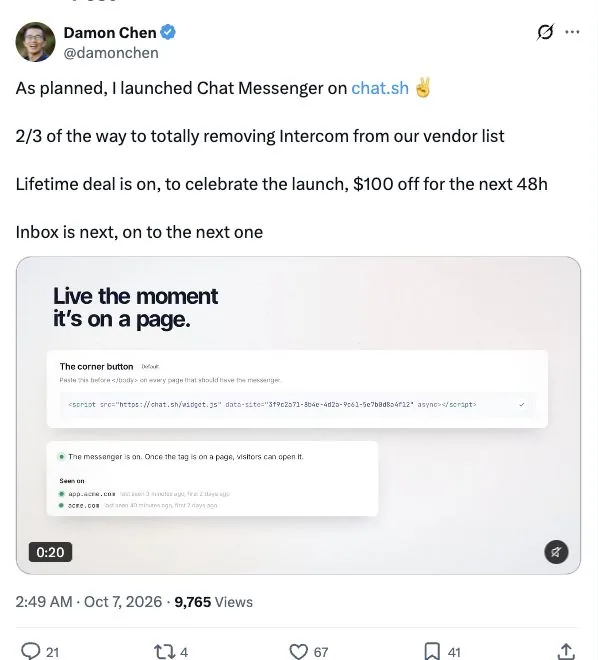
Screenshot: Damon Chen’s Chat Messenger release on X.
In an October 2026 Chat.sh update, Damon announced Chat Messenger, explained its place in replacing his existing support tools, and identified the inbox as the next piece.
Readers can distinguish what has shipped from what remains planned. That matters when someone is considering adopting a product they’ll depend on.
Try a simple sequence: describe a problem, show the improvement when it ships, and return with what you learned from people using it. Be precise about availability and limits. Follow-up posts should add evidence or useful detail. Answer questions in the replies, and turn recurring confusion into a clearer demo or help page.
5. Marc Lou: give interested readers a specific next step
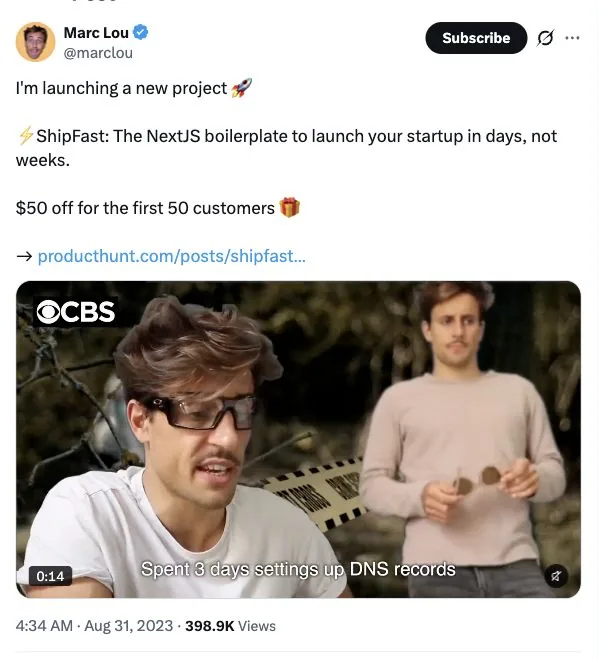
Screenshot: Marc Lou’s ShipFast launch on X.
Marc’s ShipFast launch post names the product, states the promised benefit, links to the launch, and includes a clearly bounded early-customer offer.
The transferable move is clarity. Once someone understands the benefit, tell them where to go and what to expect there.
Choose the action that fits your stage: try a sample, book a demo, or buy access. Use discounts only when they fit your business, and make any deadline genuine. If people arrive expecting a working trial, the destination should deliver that experience. Review the whole path yourself before sharing the link, including the pricing and checkout.
Build a weekly habit that connects to revenue
Pick one buyer problem this week. Publish a concrete example, invite a relevant action, and answer the questions it brings. Keep a simple record of the post, destination, qualified conversations, trials, and payments. Use a tagged link where practical and ask new customers how they found you.
Give the experiment time: someone may read several updates before purchasing. Keep those limits in your notes, and avoid assigning every later payment to your most popular post.
Review which updates brought people who understood the product and needed it. Those conversations can guide both your next post and your next product improvement. That’s a useful reason to keep building in public.