Productivity
NocGO
Coming soon: editable Apple Calendar and Reminders drafts from iPhone screenshots.
- Category
- Productivity
- Stage
- Pre-launch
- For
- iPhone users
- Platforms
- iOS
- Pricing
- Free early-access waitlist; app pricing TBD.
About
NocGO is an iPhone app in development that turns screenshots into editable calendar-event and reminder drafts. Capture with Back Tap or choose an image, review the date, time and place, then confirm what to save to Apple Calendar or Reminders. NocGO is coming soon; public access and pricing are not available yet. A free early-access waitlist is available at nocgo.com.
Features
- Problem
- Relevant plans are embedded in screenshots, and opening the app to start capture can add friction.
- How it works
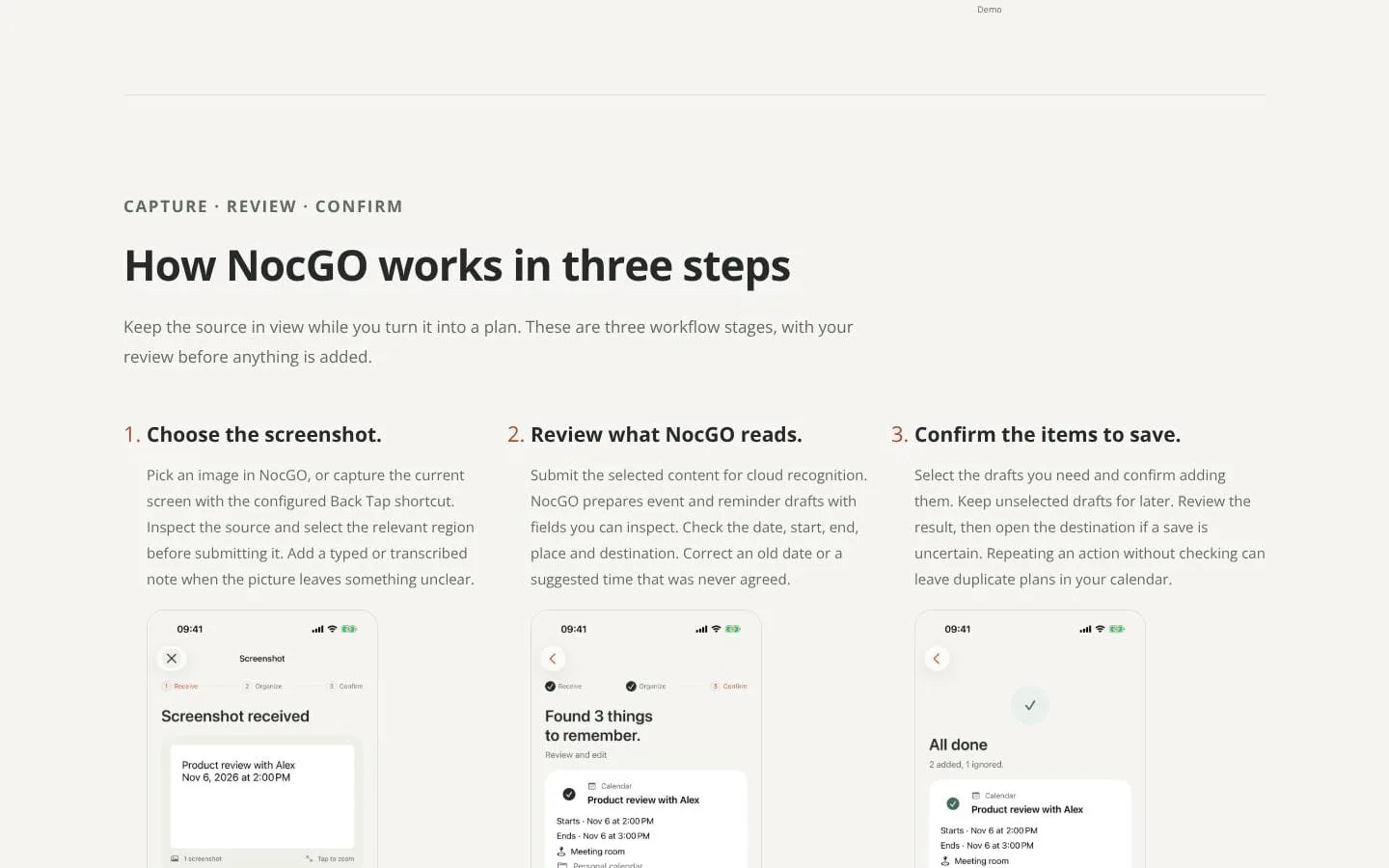
- Users can choose an image in NocGO or capture the current screen with an optional, preconfigured Back Tap shortcut. They can select the relevant image region.
- Result
- A focused image or text input is ready for recognition.
- Why
- Starting from selected content keeps the source in view and avoids processing unrelated parts of the screenshot.
- Problem
- Screenshots may omit context or include proposals that were later changed.
- How it works
- Users can add a typed request or on-device voice transcription, inspect the text, then submit selected content for cloud recognition with permission.
- Result
- NocGO prepares calendar-event and reminder drafts from the submitted content.
- Why
- Added context can clarify which detail matters; recognition requires permission and a network connection.
- Problem
- Recognition can misread dates, times, locations, task types, or destinations.
- How it works
- Users can inspect and edit draft fields, select which items to save, and leave unresolved or unselected drafts pending.
- Result
- Users retain control over which corrected drafts proceed to saving.
- Why
- A human review helps distinguish the final agreed plan from stale dates or superseded suggestions.
- Problem
- Saving an unintended item—or retrying an uncertain save—can create errors or duplicates.
- How it works
- NocGO adds only selected items after confirmation; users can check the destination if a save is uncertain.
- Result
- Confirmed items are added to an available destination, while the calendar or reminder app remains the place to manage them.
- Why
- Explicit confirmation and checking the result reduce accidental additions and duplicate plans.
- Problem
- Appointments and tasks need different destinations, and third-party integrations may not be generally available.
- How it works
- Apple Calendar and Reminders are supported destinations. Google Calendar and Todoist are in testing; users are advised to check the connection options available to their account.
- Result
- Users can direct confirmed items to a supported destination without silent additions.
- Why
- Choosing the destination deliberately keeps appointments and tasks in the appropriate place and avoids relying on unready integrations.
Product questions
What does NocGO do?
NocGO turns iPhone screenshots—or typed or transcribed instructions—into editable calendar-event and reminder drafts. Users review the details, choose what to save, and confirm before items are added to a supported destination.
Who is NocGO for?
iPhone users
How much does NocGO cost?
Free early-access waitlist; app pricing TBD.
Which platforms does NocGO support?
- iOS
Screenshots